Accessible PDFs. Readable by everyone.
Blind and partially sighted people have documents read aloud by screen readers – which only works with a clean structure.
doclarity adds headings, tables, image descriptions and more – you check before you download.
30 pages free. No card needed. Hosted in Europe.

A city council's annual report is dropped in as a PDF. doclarity's AI marks its heading, paragraph, chart, table, list and form, each numbered in reading order, and outlines each field of the form with its type and name. The chart is opened and the AI writes its alt text, marked as drafted by AI; a person reads it and accepts it. Tagging is finished and the PDF/UA checks pass. Then a screen reader reads the page aloud in that order, skipping the running header: the heading, the paragraph, the chart's description, the sub-heading, the table with its headers, the list, then each field of the form as the Tab key reaches it. Finally the result page offers the tagged PDF and the test report, and its download menu opens on the same document as HTML or Word.








1 in 17 public PDFs in Austria passes the machine check for PDF/UA.
In October 2026 we checked 193,198 publicly available PDFs from 382 public institutions in Austria. A pass is an upper bound: no checker can judge reading order or alt text.
- ~30M
- blind or visually impaired readers in Europe are locked out
- 2,000 years
- of expert work to fix these files by hand
- ½ day instead of 8.5
- for 400 pages: with doclarity instead of by handBy hand: measured in a public body's test. With doclarity: our estimate.
A tagged PDF
Sample page. The city and its figures are invented.
Sample page
Point at the page, or tab through it.
Each box is one element as doclarity tags it. The number is its place in the reading order. In the editor, every one of these is a suggestion you can change before you download.
Artifact
Not read aloud on every page
Running headers, footers and page numbers are marked as artifacts. A screen reader skips them instead of repeating them on every page.
Heading · H1
Headings you can jump between
The page's visual hierarchy becomes H1 to H6, so a screen-reader user can move from section to section instead of listening from the top.
Paragraph
Text in reading order
Body text is tagged as paragraphs, in the order a person would read the page. The number on each box is that order; in the editor you change it by dragging.
Span · language de-AT
Languages inside the text
A word or passage in another language gets its own language tag, so a screen reader switches pronunciation. Here: German, inside an English page.
Figure
Alt text, drafted for you
Charts and images get alternative text drafted by the AI, in the language you choose. You read it and edit it before anything is downloaded.
Alt textBar chart: the share of requests handled online rose every year: 38 % in 2021, 49 % in 2022, 61 % in 2023, 72 % in 2024 and 81 % in 2025.
Contrast
Light text, darkened
Text too light to read is darkened until it meets the WCAG level you set. This line goes from 1.9 : 1 to 6.0 : 1, past AA's 4.5 : 1. Point at it to see the change.
Heading · H2
A level below
Sub-headings nest under the heading before them, so the outline of the page makes sense on its own.
Table
Every value read with its headers
Column headers (2024, 2025) and row headers (Online, Phone, In person) are marked, so a cell is read as “Phone, 2025: 12 %”. You set them cell by cell in the table editor.
List · 3 items
Lists that announce themselves
Bullets and numbering become real lists with list items, so a screen reader says “list, 3 items” before it starts.
Paragraph
The link stays in its sentence
The sentence is tagged as a paragraph with the link inside it, so a screen reader reads “Read more at” and the link together, in reading order.
Link
Links that work with assistive tech
A link is tagged together with its text, so it can be found in a list of links and followed from the keyboard.
Form fields
Boxes that become fields
Lines and boxes that only look like a form become real, fillable fields. Each gets its type and a name, so a screen reader announces it and the Tab key moves from field to field in reading order.
Read aloud as“Name, text field” · “Email, text field” · “Large print, checkbox, not checked”
Footnote
Notes kept apart
Footnotes are tagged as notes, separate from the body text they belong to.
How it works
Step 1 of 4
Upload, and set the rules once.
PDF, Word, PowerPoint or LibreOffice, born-digital or scanned. The settings stay as you left them for the next file.
- PDF/UA-1 or PDF/UA-2
- Pages straightened automatically
- Real, fillable form fields
- Contrast fixed to WCAG A, AA or AAA
- Alt text in the language you choose
- Tagging rules of your own, on every page
New conversion
Drop or select PDF, Word, PowerPoint or LibreOfficeStart conversion →SettingsPDF/UA-1Auto-rotateForm fieldsPDF/UA standard
PDF/UA-1Recommended, widely requiredPDF/UA-2Newer standard (2024), less supportedAuto-rotate pages
Automatically straightens rotated pages
Create form fields
Visible form fields become fillable; exercises in school books and worksheets get answer fields.
Same as the documentAlt text language
Image descriptions are written in this language, whatever language the pages are in.
e.g. Keep alt texts short and factual, without "Image of …". Never tag logos — not even the first time in the document.User-specific tagging rules
What the AI should know about your documents, considered on every page — for example style preferences for alt texts, or how logos should be tagged.
Step 2 of 4
The AI tags every page.
doclarity reads each page and drafts the structure a screen reader needs. It is a draft: the next step is yours.
- StructureHeadings, paragraphs, lists, tables, links, footnotes and form fields, in reading order.
- Alt textA description for every chart and image, in the language you set.
- ContrastText too light to read, darkened to your WCAG level.
- LanguagesPassages in another language tagged as such.
Step 3 of 4
You review beside the real page.
Every element the AI drafts sits next to the page it came from. Nothing ships unseen.
- Change an element's type
- Rewrite alt text
- Drag the reading order
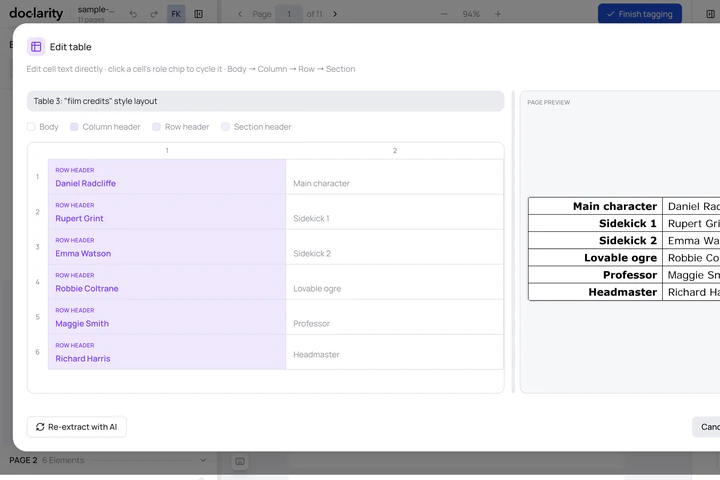
- Set table headers cell by cell
Step 4 of 4
Download, validated.
A tagged PDF, checked with veraPDF against PDF/UA, with the conformance report included. Or the same content as HTML or Word.
Compliance
veraPDF
PDF/UA-1 and PDF/UA-2, ISO 14289. Every rule, passed or still open.
WCAG 2.1
Contrast at your target, info and relationships, name, role and value.
AI review
Is the alt text meaningful? Does the reading order follow the meaning? Do the headings form a real hierarchy?
Operating models
Every plan
SaaS, hosted in Europe
In the SaaS product your data stays in Europe: hosted in Europe, 100 % GDPR-compliant, no data sharing.
Price on request
Austrian infrastructure
Open-weight models, operated with A1 as our partner. Your data never leaves Europe.
Enterprise · on request
Your own infrastructure
A complete on-premises installation. No document ever leaves your servers.

doclarity wins the Digital Changemaker Award 2026 (opens in a new tab)
WSA Austria, category Government & Citizen Engagement.
A young Viennese team is developing a solution here that gives people with visual impairments equal access to information. That is accessibility put into practice, and with it a contribution to a more inclusive society.
Quoted in brutkasten, translated from German

AI-powered PDF accessibility (opens in a new tab)
Best practice on the Federal Government's platform.

doclarity: Viennese AI solution for accessible documents already used by more than 70 institutions (opens in a new tab)
translated from German

doclarity: Viennese startup receives funding for accessible PDF documents (opens in a new tab)
translated from German
Accessibility, first-hand
For me as a blind person, doclarity is another big step towards working on equal terms and independently.
With the support of BAABSV GmbH, Klartext is working to establish doclarity as a solution for more accessible digital documents, both for blind and visually impaired users and for organisations.
With this simple solution, even non-experts can easily create accessible documents, individually adjusted where needed, from images or from inaccessible PDF and Word documents.
For me as a blind person, doclarity is another big step towards working on equal terms and independently. Not least because the data is processed in compliance with the GDPR, which makes accessible processing of sensitive content possible.
BAABSV GmbH
Translated from German
Pricing
Launch pricing — until 31 December 2026
Sign this year and keep your price for the whole term. We expect prices to rise in 2027.
Free
0 €one-off
30 pages, one-off1 userOverage: not includedMigration packages: not includedReview editorPDF/UA-1 & UA-2, veraPDF reportEU hosting & DPAWith watermarkBatch upload: not includedTeam sharing: not includedEmail supportRather not subscribe?
100 pages 238,80 € (gross)100 pages 199 € (net) · 500 pages 954 € (gross) · 500 pages 795 € (net)
To the packages →Starter
1.428 €/ year (gross)
142,80 €/ month (gross)
1.190 €/ year (net)
119 €/ month (net)
or 142,80 € / month (gross)or 1.428 € / year with annual billing (gross)or 119 € / month (net)or 1.190 € / year with annual billing (net)
1.500 pages / year125 pages / month≈ 0,95 € / page (gross)≈ 1,14 € / page (gross)≈ 0,79 € / page (net)≈ 0,95 € / page (net)3 usersOverage 1,44 € / page (gross)Overage 1,20 € / page (net)Migration up to 2.500 pagesReview editorPDF/UA-1 & UA-2, veraPDF reportEU hosting & DPANo watermark (new in this plan)Batch upload: not includedTeam sharing: not includedEmail supportFor small municipalities, associations and single departments
Team
4.080 €/ year (gross)
408 €/ month (gross)
3.400 €/ year (net)
340 €/ month (net)
or 408 € / month (gross)or 4.080 € / year with annual billing (gross)or 340 € / month (net)or 3.400 € / year with annual billing (net)
5.000 pages / year417 pages / month≈ 0,82 € / page (gross)≈ 0,98 € / page (gross)≈ 0,68 € / page (net)≈ 0,82 € / page (net)8 usersOverage 1,20 € / page (gross)Overage 1,00 € / page (net)Migration up to 10.000 pagesReview editorPDF/UA-1 & UA-2, veraPDF reportEU hosting & DPANo watermarkBatch upload (new in this plan)Team sharing (new in this plan)Email supportFor teams and mid-size organisations
- Recommended
Professional
7.080 €/ year (gross)
708 €/ month (gross)
5.900 €/ year (net)
590 €/ month (net)
or 708 € / month (gross)or 7.080 € / year with annual billing (gross)or 590 € / month (net)or 5.900 € / year with annual billing (net)
12.000 pages / year1.000 pages / month≈ 0,59 € / page (gross)≈ 0,71 € / page (gross)≈ 0,49 € / page (net)≈ 0,59 € / page (net)15 usersOverage 0,90 € / page (gross)Overage 0,75 € / page (net)Migration up to 30.000 pagesReview editorPDF/UA-1 & UA-2, veraPDF reportEU hosting & DPANo watermarkBatch uploadTeam sharingEmail supportFor public administration, universities, banks and insurers
Business
21.480 €/ year (gross)
2.148 €/ month (gross)
17.900 €/ year (net)
1.790 €/ month (net)
or 2.148 € / month (gross)or 21.480 € / year with annual billing (gross)or 1.790 € / month (net)or 17.900 € / year with annual billing (net)
48.000 pages / year4.000 pages / month≈ 0,45 € / page (gross)≈ 0,54 € / page (gross)≈ 0,37 € / page (net)≈ 0,45 € / page (net)Unlimited usersOverage 0,66 € / page (gross)Overage 0,55 € / page (net)Migration up to 50.000 pagesReview editorPDF/UA-1 & UA-2, veraPDF reportEU hosting & DPANo watermarkBatch uploadTeam sharingNamed contact (new in this plan)For large organisations with high document volume
Enterprise
On demand
Volume by agreementUnlimited usersReview editorPDF/UA-1 & UA-2, veraPDF reportEU hosting & DPANo watermarkBatch uploadTeam sharingProject team (new in this plan)- Local model on your own hardware
- Or an Austrian data centre
- Open weights, no US provider
- Pen test & training
- SSO
- Own API endpoint
- On-prem, VPC & DMS integration
- Pay on download
- Pages count only when you download the finished PDF, never on upload. Analysis and review stay free.
- Free re-runs
- Re-process the same document free of charge for 30 days.
- Rollover (annual payment only)
- With annual payment, unused pages carry into the next contract year, up to 25 % of that contract year's quota. With monthly payment they expire at the end of the month.
Towards businesses, the net prices govern and VAT is added at the statutory rate. Towards consumers, the gross price governs – it includes 20 % Austrian VAT.
Page packages without a subscription, migration packages for legacy archives, and what happens when your pages run out.
Full pricingFAQ
doclarity makes PDFs accessible, the work also known as PDF remediation. It reads each page with AI, rebuilds the tag structure – headings, lists, tables, figures with alt text, links, footnotes and reading order – fixes text contrast to your WCAG target, and returns a PDF/UA file with its validation report. A person reviews the AI's draft in the review editor and has the final word.
PDF/UA (ISO 14289) is the international standard for accessible PDF. It requires a tagged structure that screen readers and other assistive technology can follow: real headings, lists and tables, alternative text for figures, a logical reading order, a document title and language. doclarity produces PDF/UA-1, the version audits usually ask for, by default, and PDF/UA-2 when you choose it.
It depends on who publishes them, and why. The European Accessibility Act (Directive (EU) 2019/882) has applied since 28 June 2025 – in Austria as the Barrierefreiheitsgesetz (BaFG), in Germany as the Barrierefreiheitsstärkungsgesetz (BFSG). It covers products and consumer services such as e-commerce, banking and passenger transport, and with them the PDFs that are part of such a service. Public-sector bodies were already bound by the Web Accessibility Directive (EU) 2016/2102 – in Austria through the WZG, in Germany through BITV 2.0. Both lead to EN 301 549, whose requirements for documents follow WCAG 2.1 at level AA.
In our October 2026 study of 193,198 publicly available PDFs from 382 Austrian public institutions, 5.8 % passed the machine-checkable rules of PDF/UA-1, about 1 in 17. That is an upper bound: no checker can judge reading order or whether alt text is meaningful. The full results and the method are on the study page.
No tool can promise that on its own, and doclarity doesn't. Every document is validated with veraPDF against PDF/UA and checked against WCAG 2.1 success criteria, and an AI review flags the semantic problems those checkers can't see. Whether alt text says what matters, or a reading order makes sense, is still a person's call – that is what the review editor is for.
PDF, Word (DOC, DOCX), PowerPoint (PPT, PPTX) and LibreOffice (ODT, ODP) – born-digital or scanned. Office files are converted on the way in; OCR and automatic page rotation take care of scans. What comes back is the tagged PDF, the same document as HTML or Word if you need it, and a test report.
Annual plans run from 1.428 € a year for 1.500 pages (Starter) to 21.480 € for 48.000 pages (Business), including 20 % Austrian VAT (1.190 € and 17.900 € net); Enterprise is priced on demand. Monthly billing costs 20 % more. Analysis and review are free – a page counts only when you download the finished PDF – and you start with 30 free pages, no card needed. Blind and visually impaired people get private access at no cost.
That depends on how you run doclarity. The SaaS product is hosted in Europe on every plan. On request, it runs on Austrian infrastructure with open-weight models, operated with A1, or as a complete on-premises installation where no document ever leaves your servers. Every processor involved is listed in the privacy policy.
doclarity is a product of Klartext AI FlexCo in Vienna, Austria. It is led by Anna Poledna (CEO) and Benjamin Raumauf (CTO), with Ruben Hetfleisch, Daniel Toth and Felix Krause as associates. It was built with AI Factory Austria (AI:AT) and funded by the Vienna Business Agency and the FFG. Its partners include the Hilfsgemeinschaft der Blinden und Sehschwachen Österreichs, A1 and Exoscale.
About us
doclarity is a product of Klartext AI, built with AI Factory Austria and funded by the FFG and the Vienna Business Agency.
- Management
- Anna Poledna, CEO · Benjamin Raumauf, CTO
- Associates
- Ruben Hetfleisch · Daniel Toth · Felix Krause
- a product of

- built with

- Funding partner

- Funded by

Funded by the Vienna Business Agency. A fund of the City of Vienna.